As I started the marathon preparation using the Stryd as guide for my training, I spent more time switching the devices I use to execute Steve Palladino’s workouts. Using alternatively the Stryd app on my Garmin Fenix 7X and Apple Watch Ultra, I became more aware of the potential improvements for the application on the Apple Watch – sure, I represent a sample set of one, but considering that I’ve been using various platforms and solutions in the recent years – I’d like to think that my suggestions have some reality grip.
Stryd released in 2022 a new version of their app for Apple Watch with a long list of features, you may find more details here, and one of the focus areas was as the title says – “eyes-free workouts” – to be able to execute your workouts using the speech guidance available in your headphones or the Apple Watch speaker.
Based on my experience with the Stryd apps on both Garmin CIQ and Apple Watch platforms, I compiled below a list of suggestions for improvements in the usability of the Apple Watch app, as to my surprise the more constrained Garmin version has a more practical approach.
Guidance in complex structured workouts – what’s next
When you have a more complex workout, as it usually happens in a training plan, the capacity of the app to guide you is essential. For the Apple Watch version of their app, Stryd decided to take advantage of the speech capability for it’s interaction with the user and that’s cool but, in my experience, not as practical as with using the visual data the screen can offer at proper timing.
For example, if you have an workout like that in the picture below, you’d naturally want to know what are the characteristics of the step you’re executing next.
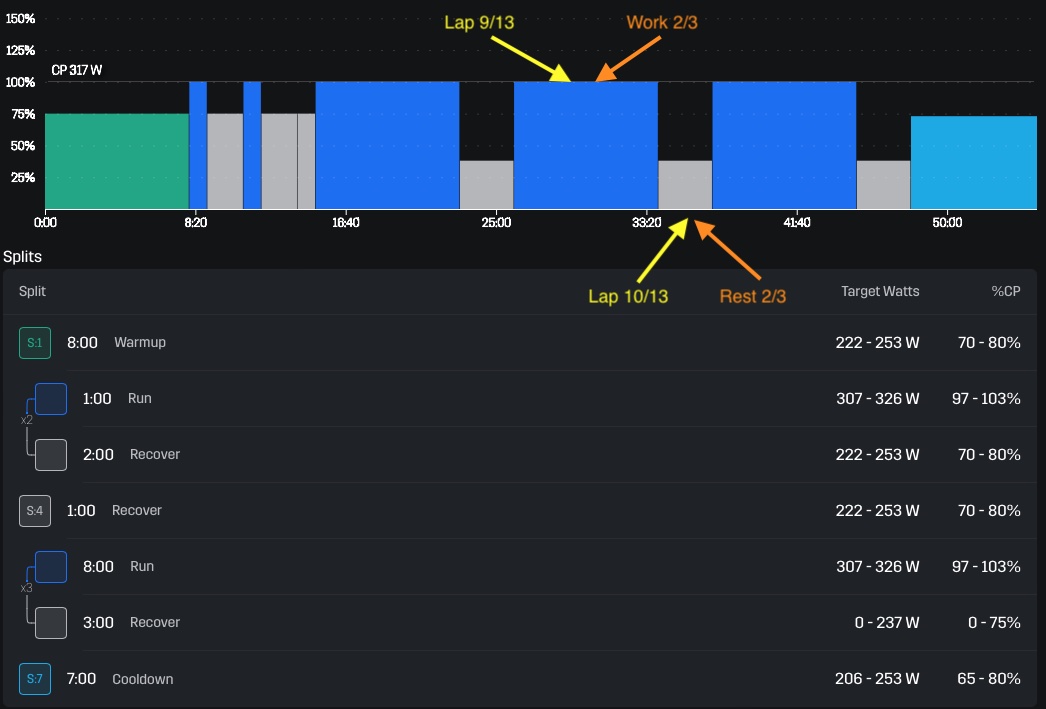
For that, the Apple Watch app uses a countdown in the last 5 seconds of the current step and that only creates (for me) the question of what’s next and I’m looking at the watch .. I don’t have the patience to wait for the voice to explain for 10 seconds the parameters of the phase, particularly if that overlaps with other audio cues as I’m already not following the prescribed intervals.
Maybe because I previously used the Stryd app on Garmin (also the Garmin Run app has a similar behaviour), my expectation is to see in those 5 seconds before the new interval the min-max values for the next interval about to happen and eventually how I finished the previous one (in terms of power, since that’s what guides us).
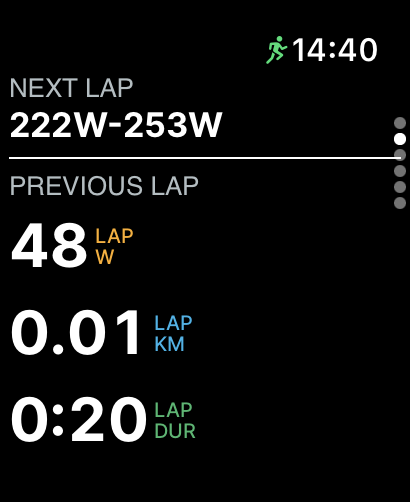
The Apple Watch app doesn’t do that, but displays the summary and the prescription after the interval starts, but the font for the Next Lap is smaller (why?!) and sometimes not easy to see .. I mean, why would I need so much to know the previous lap duration now .. instead of focusing on the current lap. This to me seems a sub-optimal use of the screen, I’d use less information but make it more legible.

I think this is one of the bigger differences in the implementations on those two platforms, the Apple Watch one wants to be more fancy but fails to be as practical as the more “rough” version on Garmin. I’d much prefer the approach on Garmin, since I can surely read faster a screen in 5 seconds than listen 10-15 seconds for the prescribed values and struggling to read the small fonts in the current versions of the Apple Watch.
Current step view
The second difference I’ve seen is related to the way the Apple Watch app displays the data related to the current lap. If you look at the picture above, with 13 steps, I’d rather like to know that I’m in the second run interval of the “work” (or second rest interval of the “work”) than to do the math of what 9/13 or 10/13 means .. when you run hard, you only want to know how many more you have to do .. and remembering the structure of the workout and doing the math is not always easy.
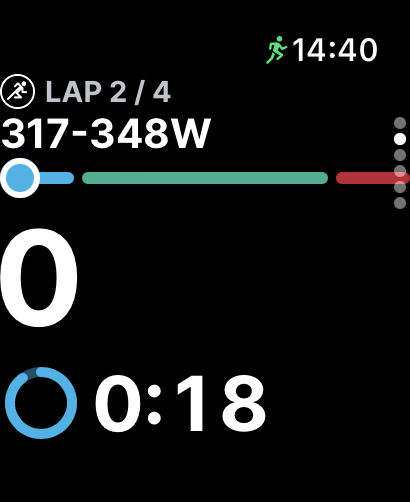
The Garmin implementation is better (in my view), since it allows you to know how many “hard” intervals are there in the “work” area .. it’s not perfect, but better than the Apple Watch implementation.

Switch to an active screen automatically after the end of the execution of the structured workout.
Unless you’re doing your workouts on a track, if you’re running in parks or cities, even with effort, you won’t finish the time based structured workouts exactly where you started, therefor you’ll continue your run for some minutes depending on the position relative to your start. I usually match my city run to not have more than several minutes extra to run after I finish the structured workout, but I usually will continue to run even after the “prescription” is completed.
The Apple Watch announces you that your workout ends in 20 secs and after that, it will display the screen below, which doesn’t offer too much info ..

The Garmin implementation is a bit better, adding the total time to the power, but not great.

I’ve seen even poorer implementations, with Polar Vantage V2 (and other Polar recent models) displaying an information screen that the workout is completed and you need to dismiss that screen or move to another screen yourself to have something meaningful on the screen of your watch. But also, I’ve seen that the Garmin native run switches to the first screen of the run app automatically after the structured workout is finished. A behaviour like that would be great (in my books) since it’s this way the watch show information that’s meaningful for me (I already know I finished the structured workout).
Discard as option to finish a run in Apple Watch App
On the Apple Watch app, if you start an workout you can stop it, but I haven’t seen an option to discard the run if that’s not relevant for me, leading to collecting some “ghost” runs in your PowerCenter and eventually other planforms you connected to PowerCenter (for example Strava). The cleanup can be done manually after that in each platform.
The Garmin app allows you to save or discard the activity, giving you more options.
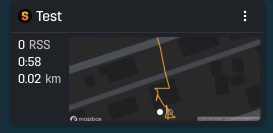
Update (2 Aug 2023): I noticed the next day after publishing the initial post that there is an option to discard the activity in the AW app, but that only is available if the recorded activity is very short (don’t know how long .. most probably less than 1 minute, since the test performed with an activity longer than 1 minute didn’t offer this option). So, the approach is similar to what I’ve seen with Polar Vantage, where the (very) short activities could be discarded, but only if they were really short. I’d really appreciate the flexibility of deciding to discard even longer activities for whatever reason.
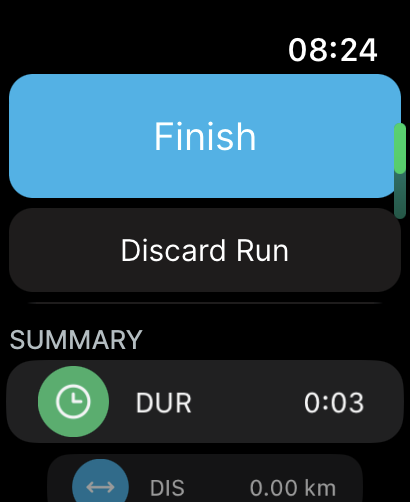
There is still some inconsistency there, since the run is discarded from Stryd’s perspective, but the activity in the Apple Watch is still saved for some reason..maybe the transaction loop should be treated in a different way.

I also discovered a bug, which allows you to navigate to the “deeper” screens of the app, but doesn’t allow the navigation back, forcing you to kill the app and restart it if you want to continue use it. Maybe that’s because I’m using the Apple Watch OS 10 beta, but definitely it would worth a look, because for the regular users it may create an issue they may not know how to solve easily. Unfortunately, I don’t have a clear reproduction path, it happened in different screens and it wasn’t the consequence of some fancy gestures.
I realise that Stryd has limited resources they need to commit to so many areas, like new R&D, device firmware, backend APIs/PowerCenter, Garmin CIQ app, Apple Watch app, but it’s important in this competitive landscape to offer the best user experience – I imagine that if some of the other players supporting (own) running power would offer a cohesive training with power opportunity, life would become more difficult for Stryd. They still have the lead with the responsiveness of the device, algorithms and focus on the running power training, but the market is so dynamic. Apple WatchOS 10 brings Custom Workout APIs (more details here) which for example may ease up the transition of some people using external platforms to use Apple Watch as the recording device of choice instead of buying additional sensors.
I have used Stryd since 2017 and constantly looked at alternatives to use the Stryd in conjunction with various sport watches and platforms, I’m always looking for the best experience to support the benefits Stryd can bring to my training – that’s the main reason for this post, I hope it will support the continuous improvement of the user experience.
With that, enjoy your running (regardless of your apps, devices and platforms)!
Discover more from Liviu Nastasa
Subscribe to get the latest posts sent to your email.

 Liviu Nastasa